How to Create a Good Looking UI for a Website

Creating a good looking UI for a website is no longer just about adding beautiful colors or animations. In today’s competitive digital space, user interface (UI) design directly impacts trust, engagement, SEO rankings, and business revenue.
Whether you are building a small business website, an e-commerce platform, or a corporate portal, understanding how to create a good looking UI for a website can dramatically improve your success online.
At Cyber Aliens, we have seen how strategic UI design transforms businesses by increasing conversions and improving user experience. This guide explains the professional approach used by experts.
Why Website UI Matters (Data-Driven Insights)

Before understanding how to create a good looking UI for a website, it’s important to understand why it matters.
Here are some proven insights:
- 94% of first impressions are design-related
- Users form an opinion about a website in 0.05 seconds
- A poor user interface can increase bounce rate by nearly 38%
- Over 60–70% of website traffic comes from mobile devices
- A well-optimized UI can improve conversion rates by 200% or more
UI is not just about appearance. It directly affects:
- Brand trust
- User engagement
- Conversion rate
- SEO performance
- Customer retention
A poorly designed website may look “okay,” but if users struggle to navigate or find information, they leave immediately.
A good looking UI creates clarity, trust, and action.
Step-by-Step Guide: How to Create a Good Looking UI for a Website

Let’s break down the professional process.
Step 1: Understand Your Target Audience

The first step in creating a good looking UI for a website is research.
Before designing anything, ask:
- Who is the target audience?
- What device do they use most?
- What problem are they trying to solve?
- What action do we want them to take?
Create user personas that define:
- Age group
- Behavior
- Device preference
- Goals
Examples:
- E-commerce website → Fast product browsing + quick checkout
- Service business website → Clear contact form + strong CTA
- Portfolio website → Strong visuals + smooth navigation
A professional UI solves user problems first and looks beautiful second.
At Cyber Aliens, we begin every project with user psychology research instead of jumping directly into design tools.
Step 2: Start with Wireframes (The Blueprint Stage)
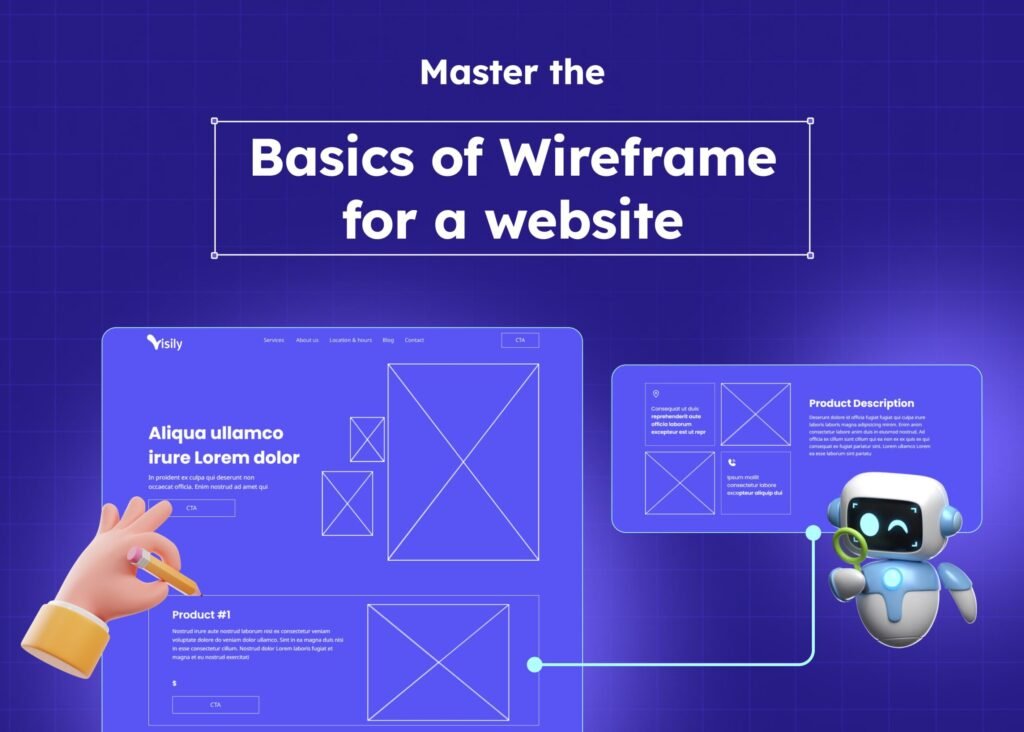
Before colors, fonts, or images — create wireframes.
Wireframing helps you:
- Sketch the layout structure
- Plan header, hero section, and content blocks
- Decide CTA placement
- Design mobile-first structure
Professional tools include:
- Figma
- Adobe XD
- Sketch
Wireframing reduces redesign time by up to 30–40%, because structure problems are solved early.
Think of wireframes as the architectural plan of a building. Without it, your design may look good but feel unbalanced.
Step 3: Follow Core UI Design Principles

To create a good looking UI for a website, follow proven design principles.
1️⃣ Visual Hierarchy
Users should instantly know:
- What is most important
- Where to look first
- What action to take
Use:
- Larger fonts for headlines
- High contrast for CTAs
- Proper whitespace
Bigger and bolder elements naturally draw attention.
2️⃣ Consistency
Consistency builds trust.
Maintain:
- Same button styles
- Same font families
- Same spacing rules
- Same icon styles
Inconsistent UI creates confusion and reduces professionalism.
3️⃣ Alignment and Spacing
Good UI is clean and balanced.
Use:
- 8px grid system
- Proper padding
- Balanced margins
Spacing improves readability and reduces visual stress.
Cluttered design is one of the biggest UI mistakes.
4️⃣ Typography Best Practices
Limit typography to:
- Maximum 2–3 fonts
- Minimum 16px body text
- Line height between 1.4–1.6
Readable typography makes your website look premium and professional.
5️⃣ Color Psychology
Color directly influences user emotion.
- Blue → Trust and reliability
- Green → Growth and health
- Red → Urgency and action
- Black → Premium and luxury
A good looking UI uses 2–3 primary colors and maintains brand consistency.
At Cyber Aliens, we align brand psychology with color strategy for better conversions.
Step 4: Mobile Responsiveness (Most Important Today)

Google uses mobile-first indexing.
That means your mobile UI matters more than desktop.
When learning how to create a good looking UI for a website, always:
- Design mobile first
- Use thumb-friendly buttons
- Avoid small clickable elements
- Use responsive grids
Over 60% of users browse via smartphones. If your website is not mobile-friendly, you lose traffic and SEO rankings.
Step 5: Optimize for Speed

A good looking UI must also load fast.
If page load time increases from 1 second to 3 seconds, bounce rate can increase by over 30%.
Improve speed by:
- Compressing images
- Using modern formats like WebP
- Reducing heavy animations
- Optimizing CSS and JavaScript
- Using clean code structure
Fast websites rank better and convert better.
At Cyber Aliens, we balance aesthetics with performance optimization to ensure design does not slow down the website.
Step 6: Use Clear and Strategic CTAs

A website without a clear call-to-action fails its purpose.
Examples:
- Get a Free Quote
- Book Consultation
- Contact Us
- Start Now
CTA best practices:
- High contrast button
- Placed above the fold
- Repeated strategically
- Clear and action-driven text
Your UI should guide users toward one main action.
Too many CTAs confuse users.
Step 7: Test Before Launch

Professional UI design always includes testing.
Testing includes:
- Cross-browser testing
- Mobile testing
- User experience testing
- A/B testing
Testing helps identify:
- Confusing navigation
- Broken layout issues
- Low-performing CTA placement
Professional teams refine multiple versions before final launch.
Common UI Mistakes to Avoid

If you want to create a good looking UI for a website, avoid these errors:
❌ Too many colors
❌ Poor contrast between text and background
❌ Cluttered layout
❌ Too many fonts
❌ Slow animations
❌ Confusing navigation
❌ No clear CTA
Minimalism and clarity always outperform complexity.
Time Investment Required for Good UI

Many businesses ask: “How long does it take to design a professional UI?”
For a small business website:
- Research: 2–3 days
- Wireframing: 2 days
- UI Design: 5–7 days
- Revisions & Testing: 3–5 days
Total: 10–15 days for professional results.
Designing a website in 2 days usually means weak planning and poor user experience.
Good UI takes strategy, testing, and refinement.
Why Cyber Aliens Does It Better

When it comes to creating a good looking UI for a website, experience matters.
Cyber Aliens stands out because of:
Research-Driven UI
We design based on user psychology, not trends alone.
Mobile-First Approach
We prioritize mobile UI because most users browse through smartphones.
Speed + Design Balance
Our websites are visually stunning and technically optimized.
SEO-Integrated UI
Our UI structure improves:
- Crawlability
- Content hierarchy
- Conversion optimization
Local Market Understanding
We understand Kerala and Alappuzha business behavior and user expectations.
Custom Design — Not Templates
Every project is uniquely designed to match brand identity.
A professional UI is not just about looking good — it must perform well.
Final Thoughts

Understanding how to create a good looking UI for a website means combining:
- User psychology
- Visual design principles
- Mobile responsiveness
- Speed optimization
- Strategic CTAs
- Testing and refinement
A good looking UI is not about adding more colors or animations. It is about clarity, usability, speed, and strategic design decisions.
Professional UI combines aesthetics with psychology and performance.
If you want a website that not only looks impressive but also converts visitors into customers, working with an experienced team like Cyber Aliens can make the difference.